
1. Introduction
It’s a common task to implement services that demand some form of network communication. In such cases, we typically need to write server and client code to enable that communication.
In this article, we’ll learn how to generate client code automatically using the OpenAPI Specification.
2. Defining a Demo API in YAML
The OpenAPI Specification utilizes a YAML file definition to describe the structure of an API. Both the server and client applications can import that definition seamlessly to generate both server and client code.
To illustrate client-code generation, let’s define a demo weather API using a weatherapi.yaml file:
openapi: 3.0.3
info:
  title: Current Weather API
  description: |
    Get real-time weather information for cities worldwide.
  version: 1.0.0
paths:
  /weather:
    get:
      summary: Get current weather data
      description: Retrieve current weather information for a specified city
      operationId: getCurrentWeather
      parameters:
        - name: city
          in: query
          required: true
          schema:
            type: string
        - name: units
          in: query
          required: false
          schema:
            type: string
            enum: [ celsius, fahrenheit ]
            default: celsius
      responses:
        '200':
          description: Successful weather data retrieval
          content:
            application/json:
              schema:
                $ref: '#/components/schemas/WeatherResponse'
        '404':
          description: City not found
          content:
            application/json:
              schema:
                $ref: '#/components/schemas/ErrorResponse'
components:
  schemas:
    WeatherResponse:
      type: object
      required:
        - location
      properties:
        current:
          type: object
          required:
            - temperature
            - units
          properties:
            temperature:
              type: number
              format: double
            units:
              type: string
              enum: [ celsius, fahrenheit ]
            timestamp:
              type: string
              format: date-time
    ErrorResponse:
      type: object
      required:
        - code
        - message
      properties:
        code:
          type: string
        message:
          type: string
The API has a single REST endpoint that gets the current weather and returns a success response or an error.
3. Configuring the Project
We’ll need a few dependencies and a Maven plugin configuration to generate Java code from our YAML file.
3.1. Adding the Maven Dependencies
To compile the generated code correctly, we’ll need the spring-boot-starter-web and spring-starter-validation dependencies to get a few web classes and annotations from there:
<dependency>
    <groupId>org.springframework.boot</groupId>
    <artifactId>spring-boot-starter-web</artifactId>
</dependency>
<dependency>
    <groupId>org.springframework.boot</groupId>
    <artifactId>spring-boot-starter-validation</artifactId>
</dependency>
3.2. Configuring the OpenAPI Maven Plugin
We should also set the openapi-generator-maven-plugin execution in the OpenAPI dependency to generate client code:
<plugins>
    <plugin>
        <groupId>org.openapitools</groupId>
        <artifactId>openapi-generator-maven-plugin</artifactId>
        <version>${openapi-generator.version}</version>
        <executions>
            <execution>
                <id>generate-weather-api</id>
                <goals>
                    <goal>generate</goal>
                </goals>
                <configuration>
                    <inputSpec>${project.basedir}/src/main/resources/api/weatherapi.yaml</inputSpec>
                    <generatorName>spring</generatorName>
                    <configOptions>
                        <openApiNullable>false</openApiNullable>
                        <useJakartaEe>false</useJakartaEe>
                        <documentationProvider>none</documentationProvider>
                        <annotationLibrary>none</annotationLibrary>
                        <apiPackage>com.baeldung.tutorials.openapi.generatehttpclients.api</apiPackage>
                        <modelPackage>com.baeldung.tutorials.openapi.generatehttpclients.api.model</modelPackage>
                    </configOptions>
                </configuration>
            </execution>
        </executions>
    </plugin>
    <plugin>
        <groupId>org.springframework.boot</groupId>
        <artifactId>spring-boot-maven-plugin</artifactId>
    </plugin>
</plugins>
In the snippet above, we defined a Maven execution to generate the code from our YAML file from the configuration set:
- inputSpec: the location of our YAML file
- generatorName: a generator from the ones available
- openApiNullable: whether the code should use Jackson Nullable library or not
- useJakartaEe: whether the code should use the jakarta namespace instead of javax
- documentationProvider: the source of documentation for the API. It’s either none or source. The latter means that it’ll document as described in the YAML file.
- annotationLibrary: the annotation library to use in documentation if documentationProvider is set to non-none
- apiPackage: the target package for API-related classes
- modelPackage: the target package for model classes
Another important configOption that was not listed there (because we’re using the default) is library. OpenAPI provides options for the library that we want to generate code for, such as RestTemplate, OpenFeign, or RestAssured, among others.
4. Generating API Clients
After setting up basic OpenAPI configuration, we can generate code using the Maven plugin by running:
mvn compileAfter that, we’ll be able to see the generated classes under the path in the target folder:
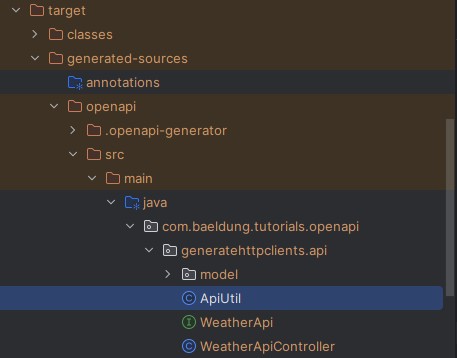
We can see two important files there: the WeatherApi interface and the WeatherApiController. Let’s glance at how OpenAPI generator generated WeatherApi:
public interface WeatherApi {
    default Optional<NativeWebRequest> getRequest() {
        return Optional.empty();
    }
    @RequestMapping(
        method = RequestMethod.GET,
        value = "/weather",
        produces = { "application/json" }
    )

    default ResponseEntity<WeatherResponse> getCurrentWeather(
        @NotNull  @Valid @RequestParam(value = "city", required = true) String city,
         @Valid @RequestParam(value = "units", required = false, defaultValue = "celsius") String units
    ) {
           // default example implementation
    }
}
After removing some clutter from the generated code, we get the getCurrentWeather() method, which defines the endpoint at /weather using the @RequestMapping annotation. That method serializes, validates, and provides defaults for the input as we defined in our YAML specification, using @Valid, @NotNull, and @RequestParam annotations.
Then, if we look at the WeatherApiController:
@Controller
@RequestMapping("${openapi.currentWeather.base-path:}")
public class WeatherApiController implements WeatherApi {
    private final NativeWebRequest request;
    @Autowired
    public WeatherApiController(NativeWebRequest request) {
        this.request = request;
    }
    @Override
    public Optional<NativeWebRequest> getRequest() {
        return Optional.ofNullable(request);
    }
}
We can see that it also generated a Spring auto-configured implementation of WeatherApiController with a few sample methods. It already uses an environment variable in @RequestMapping, so clients that import that bundle into their projects can set the API base path via configuration. For instance, at the client side, we could import an exported module that has the api generated package and just set a base-path resource and inject WeatherApi automatically:
@Service
public class GetWeatherService {
    private final WeatherApi weatherApi;
    public GetWeatherService(WeatherApi weatherApi) {
        this.weatherApi = weatherApi;
    }
    public WeatherResponse getCurrentWeather(String city, String units) {
        var response = weatherApi.getCurrentWeather(city, units);
        if (response.getStatusCodeValue() < 399) {
            return response.getBody();
        }
        throw new RuntimeException("Failed to get current weather for " + city);
    }
}
And at the client’s application.yaml:
openapi:
  currentWeather:
    base-path: https://localhost:8080
5. Advantages of OpenAPI
The OpenAPI generator can be helpful in situations where a service exposes an endpoint and has clients that depend on it. In that case, we can maintain two modules, one for clients and another for the server, both of which read the API contract from the same OpenAPI YAML specification.
Hence, both modules would be up-to-date with the latest API contract, thereby minimizing the risk of breaking the contract between client and server applications. That requires a more granular management of the client module versioning, and requires that clients keep the library up-to-date on their side.
Notably, using code generators provides us with the advantage of skipping part of the manual code implementation. Thus, we can reduce the effort required to create communication between the client and server, as the code on both sides can be auto-generated.
For instance, in a situation where the same developer needs to implement both the server and client code, it could be productive to reduce those two efforts to just creating the OpenAPI YAML specification file and let the generator do its job.
6. Drawbacks of OpenAPI
As with any code generator, we have the drawback of not having total control over how the generated code looks. For more customized and complex client code needs, it can be painful to use generators, as we lack control over what’s being generated.
For instance, OpenAPI currently generates mutable model classes for API responses, which it could instead leverage Java Records for simplicity and safety.
Additionally, with generated code, we also lack control over debugging, troubleshooting, and fixing code, as we can’t modify it.
Finally, it introduces another dependency with a set of transitive dependencies, which requires more effort to update and avoid incompatibility and security issues.
7. Conclusion
In this article, we’ve seen how to auto-generate client code using OpenAPI Specification and the OpenAPI Maven plugin. We’ve addressed the typical case of generating simple REST clients using the spring-web dependency and the API described in an OpenAPI Specification YAML file.
We’ve also examined the advantages and disadvantages of using such a library to generate code for our use.
As always, the code is available over on GitHub.
The post Generating HTTP Clients in Spring Boot from OpenAPI Spec first appeared on Baeldung.


